





AI VISIBILITY PLATFORM

Verified shop facts, stored AI answers, and tracked fixes.

SocialCRM compares your approved shop profile with responses from configured OpenAI, Anthropic, Google Gemini, and Perplexity APIs. It records the evidence and routes the next action.

AI provider APIs checked
4
ways we check: organic visibility and AI-answer accuracy
2
shop-system connectors, each with rollout status shown
3
measure, fix, and re-check
1 loop

AI discovery landscape — provider checks, search surfaces, and shopping assistants

AI Overviews by Google

AI Overviews

Google · Landscape only

AI Mode by Google

AI Mode

Google · Landscape only

Copilot by Microsoft

Copilot

Microsoft · Landscape only

Perplexity API by Perplexity

Perplexity API

Perplexity · Provider API check

OpenAI API by OpenAI

OpenAI API

OpenAI · Provider API check

Anthropic API by Anthropic

Anthropic API

Anthropic · Provider API check

Gemini API by Google

Gemini API

Google · Provider API check

Meta AI by Meta

Meta AI

Meta · Landscape only

Grok API by xAI

Grok API

xAI · Provider API check

AI Overviews by Google

AI Overviews

Google · Landscape only

AI Mode by Google

AI Mode

Google · Landscape only

Copilot by Microsoft

Copilot

Microsoft · Landscape only

Perplexity API by Perplexity

Perplexity API

Perplexity · Provider API check

OpenAI API by OpenAI

OpenAI API

OpenAI · Provider API check

Anthropic API by Anthropic

Anthropic API

Anthropic · Provider API check

Gemini API by Google

Gemini API

Google · Provider API check

Meta AI by Meta

Meta AI

Meta · Landscape only

Grok API by xAI

Grok API

xAI · Provider API check

Generic SEO tools
Show you rankings, not AI recommendations
SocialCRM
Stores verified shop facts, provider answers, evidence, and tracked fixes
Release standard
No result without a provider, stored answer, and explicit evaluation state
The Modules

What each module does.

Shop Profile Builder

Keep services, certifications, hours, specialties, and source evidence in one versioned profile.

  • Enter verified facts directly or use a supported, credentialed connector
  • Keep a versioned record of approved profile changes
  • Flag stale public facts for review before you publish a correction
  • Attach public pages and reviews as evidence for each profile

Versioned shop facts and evidence

Open in dashboard
Shop profile for Bay Area Honda with AI Visibility Score 76 and a provider evidence breakdown
Shop Profile

Simulation Evidence

Store each provider answer, evaluation status, evidence snapshot, and comparison result.

  • Run one query against one provider or a controlled provider batch
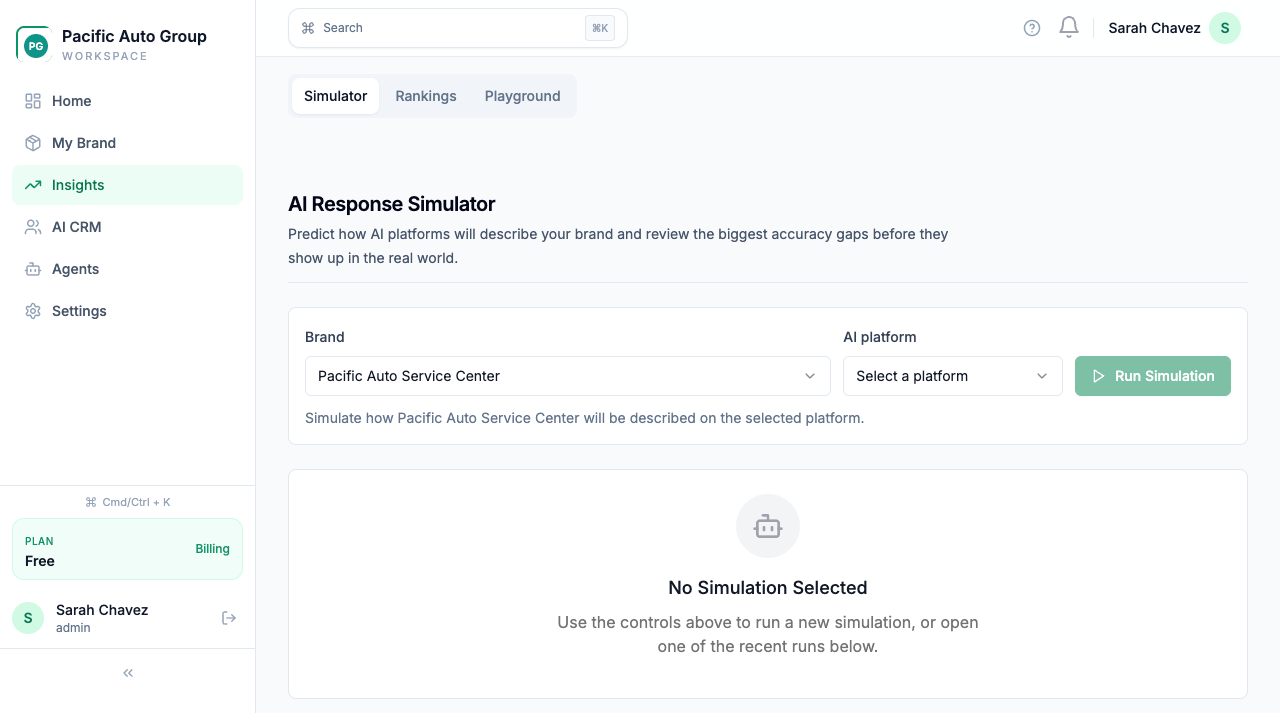
  • Check whether AI mentions your shop without supplied facts (organic visibility), then check answers with approved shop facts supplied (grounded readiness)
  • Record provider, model, prompt, answer, and evaluation state
  • Keep failed evaluations explicit instead of substituting a score

4 APIs OpenAI, Anthropic, Google Gemini, and Perplexity

Open in dashboard
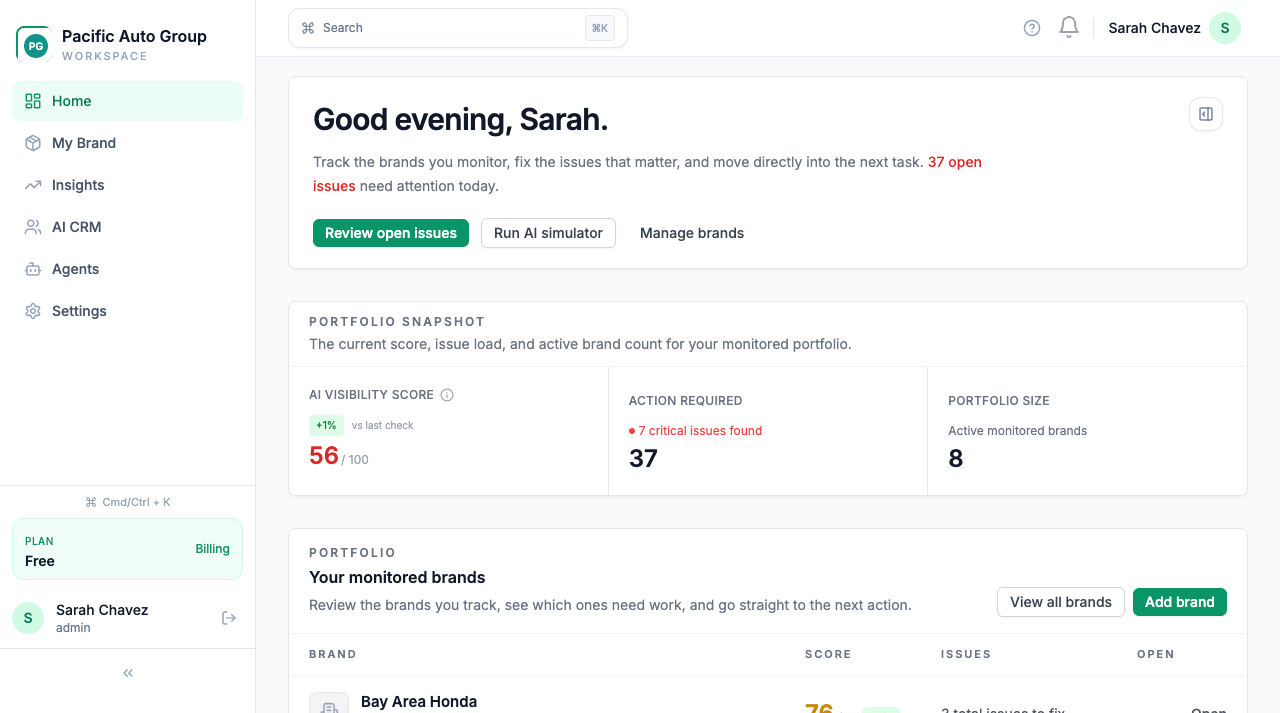
SocialCRM dashboard showing AI Visibility Score, action items, and monitored brand portfolio
Dashboard

AI Visibility Tracker

Compare stored provider answers by service query, vehicle make, location, and competitor mention.

  • Compare configured OpenAI, Anthropic, Google Gemini, and Perplexity API results
  • Break down coverage by service category, vehicle make, and location
  • Surface named competitors and the evidence present in each stored answer
  • Prioritize fixes by severity and evidence, not an unsupported revenue estimate

4 live engines mystery-shopped in shop checkups

Open in dashboard
AI Simulator result showing the selected provider, stored answer, accuracy evidence, and suggested fixes
AI Simulator

Action Workspace

Turn a measured gap into an approved content, profile, or structured-data action. Then run the same query again.

  • Generate draft content from verified brand and shop facts
  • Review structured-data and bot-access recommendations before deployment
  • Track the owner and status of each approved action
  • Re-run the original query and compare the stored result

Closed loop measure, approve, fix, and re-check

Open in dashboard
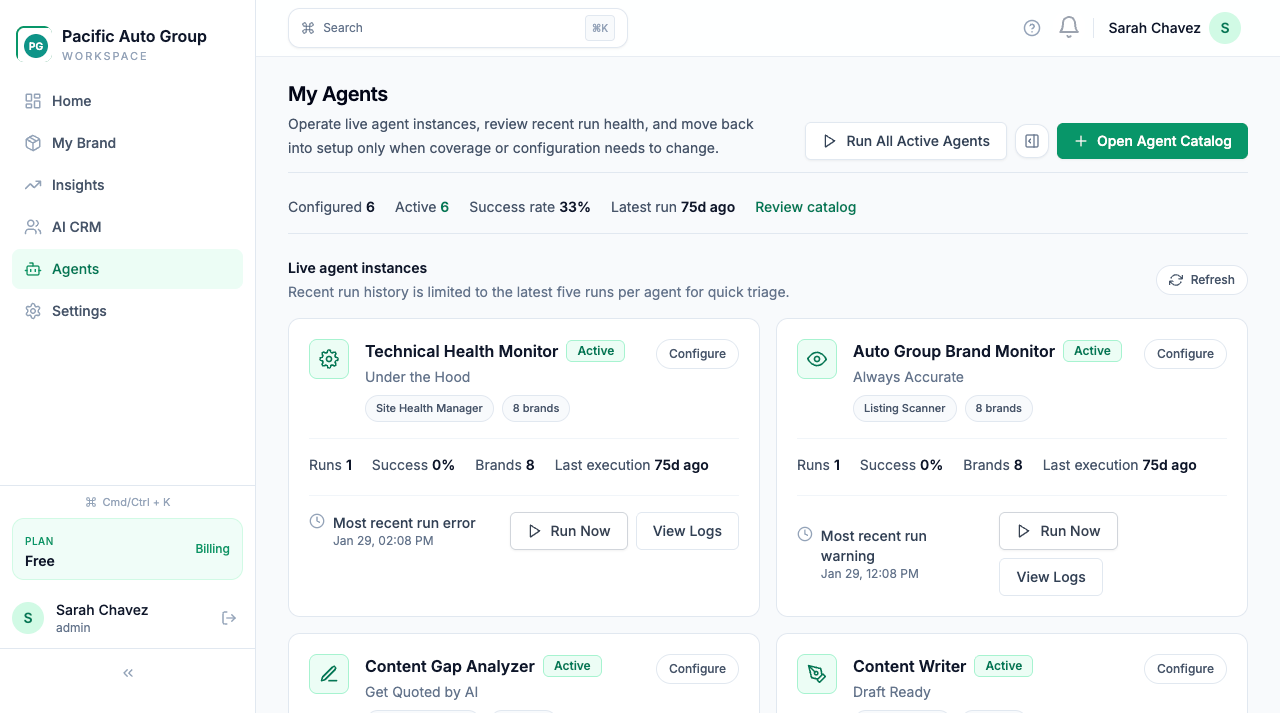
Live AI agents monitoring brand health, listings, content gaps, and competitive intelligence
AI Agents
Shop Stack Integrations

Fixes flow directly into your shop stack.

Shop management system connections can supply approved shop facts. Availability depends on the connector requirements below.

  • Shopmonkey: A working API key and a successful test connection are required. Supported fields include location, hours, and your service list. Pricing not published.
  • Tekmetric: Not self-serve yet. Tekmetric partner credentials and a successful test connection are required before your shop data can sync. Pricing not published.
  • Shop-Ware: Still being built. It cannot sync real shop data today. Pricing not published.
See All Integrations →
ShopmonkeyIn rollout
TekmetricIn rollout
Shop-WarePlanned
How It Works

Live in three steps.

01

Connect your shop system

Enter verified facts or connect a supported shop system after its credentialed connection test passes.

02

AI gets the real facts

Run a controlled query against a configured provider API. Store the answer, evidence, and evaluation state.

03

Approve a fix and re-check

Route a content, profile, or structured-data action. Then run the same query and compare the result.

Trust and Operations

Security your service manager never has to think about.

When AI represents your shop, the data behind it has to be locked down. The controls are in the product and documented for your team.

01

Security by default

TLS in transit, AES-256 at rest, and row-level security for tenant isolation.
02

Access and accountability

Role-based access control, MFA, and audit logging for teams that need operational clarity.
03

Plain-language documentation

Security details, DPA terms, and subprocessor information are available before procurement asks.
04

Built for real operations

Support for multi-location workflows, shop-system alignment, and AI-facing brand accuracy.

The details, in writing:

Shop Owner FAQs

Real answers for shop owners getting AI-recommended.

The questions every shop owner and service manager asks when they first hear about AI visibility.

GEO for Auto Shops

Generative Engine Optimization (GEO) means improving the shop facts AI can use: services, hours, certifications, and location. It does not guarantee a recommendation.

SEO targets search-result ranking. GEO improves the facts and content that answer engines can retrieve. Neither method guarantees that an AI product will recommend a shop.

Your shop profile is the structured truth about your shop: services you offer, makes/models you work on, hours, certifications, reviews. SocialCRM builds and maintains this so AI engines have accurate data.

Common Shop Problems

This is a hallucination — AI is guessing. SocialCRM detects the mismatch, shows the source of truth, and routes the correction into a fix workflow.

Very likely. When AI recommends your shop for the wrong services, you get bad-fit calls that waste your service advisors' time. SocialCRM fixes the underlying data so AI stops sending mismatched customers.

SocialCRM stores verified services, reviews, certifications, and service-area facts in a shop profile. It then checks how configured AI provider APIs describe your shop for the query.

Platform & Setup

Shopmonkey: in rollout. A working API key and a successful test connection are required. Supported fields include location, hours, and your service list. Pricing not published. Tekmetric: in rollout. Not self-serve yet. Tekmetric partner credentials and a successful test connection are required before your shop data can sync. Pricing not published. Shop-Ware: planned. Still being built. It cannot sync real shop data today. Pricing not published.

No — and that's intentional. SocialCRM measures what AI tells drivers about your shop and routes the fixes to your team. It doesn't read your calendar, confirm bookings, or take credit for booked jobs. If booking workflows ever ship, they'll be announced on this page first.

We confirm your shop facts together, build the initial profile, and run a checkup across the core AI engines before turning on automation.

Results & ROI

SocialCRM starts by showing which core AI engines mention your shop, what facts they get wrong, and which fixes should be re-checked after correction.

We run controlled checks against available OpenAI, Anthropic, Google Gemini, and Perplexity APIs. Shopping assistants that recommend or buy are visibility targets, but SocialCRM does not query them yet. You get the stored provider answer, the verified shop facts, and the next correction to review.

Single-location shops get the same evidence workflow as multi-location groups: controlled provider API checks, verified shop facts, and corrections to review. Run the free checkup first and decide from the stored result.

Fix what AI gets wrong about your shop.

Run a controlled check against an available provider API. The report stores the answer, fact gaps, and first suggested fix.

No credit card to start